
1. 'Plastic Porcelain' Skin & Asymmetric Eye Reflections
When human beings look at a photo, our brains are naturally wired to look at faces first. Generative AI models often over-smooth skin textures or render inconsistent specular reflections across the eyes.
How to Spot It With Your Naked Eye:
- Zoom In on the Iris & Pupils: In real humans, pupils are circular. In some AI-generated portraits, pupils appear irregular, oval, or have "keyhole" indentations.
- Check the Catchlights (Reflections): If a subject was photographed under a single light or window, that reflection should appear consistently in both eyes. AI images sometimes render different reflection shapes in the left and right eyes.
- Look at Skin Texture (With Caveats): Overly glossy, wax-like skin can be a sign of diffusion synthesis—though aggressive smartphone "beauty mode" filters produce a very similar effect.
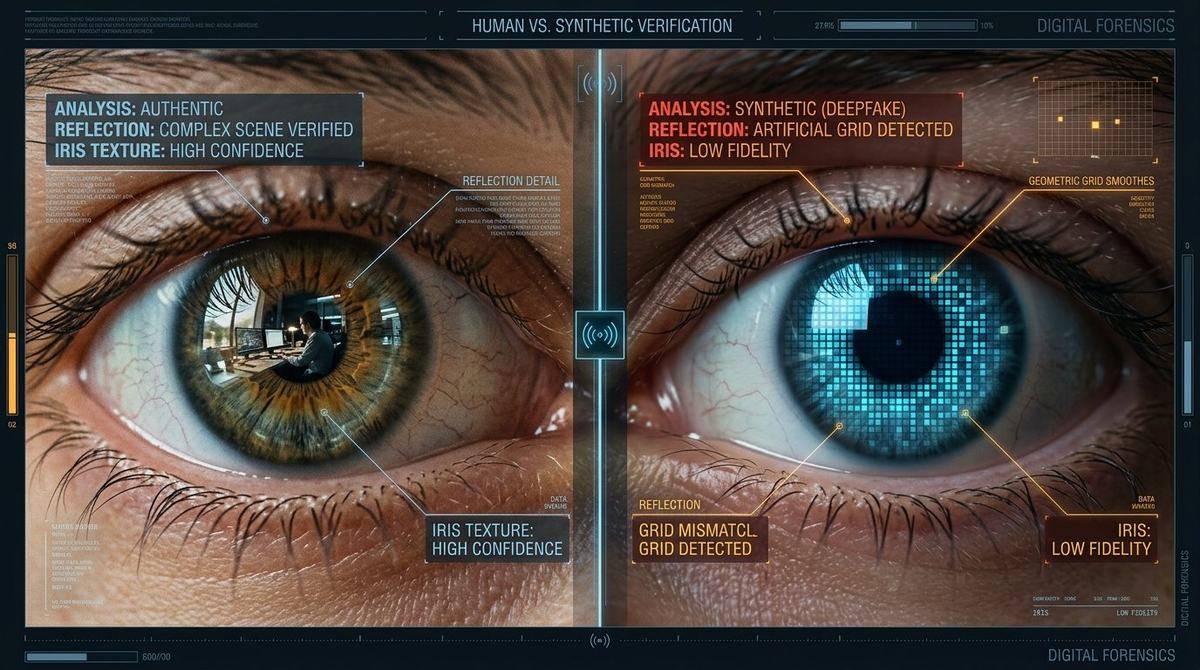
How the OriginSift Workbench Inspects This:
Our AI Image Detector runs a 3-model AI Vision Classifier Ensemble alongside Error Level Analysis (ELA) and a 3×3 Regional Noise Consistency Grid. While ELA and regional Laplacian variance highlight localized splicing or inpainting (such as a face pasted onto another photo), uniform full-canvas AI images are evaluated through provenance records, 2D FFT spectra, and multi-model vision triage.
2. Anatomical Inconsistencies: Fingers, Knuckles, Ears & Teeth
While AI image generators have improved significantly since the "six-finger hands" of 2023, complex hand poses, overlapping fingers, and fine cartilage details still occasionally trip up image models.
How to Spot It With Your Naked Eye:
- Trace Each Finger From Base to Tip: Don't just count five digits—trace each finger along its full length, especially where hands hold objects or overlap.
- Inspect Fingernails & Cuticles: Real fingernails have a distinct cuticle margin. AI hands sometimes blur the nail boundary into the surrounding skin.
- Check Teeth & Ear Cartilage: Look for overly uniform rows of front teeth or earlobes that merge into hair or earrings.
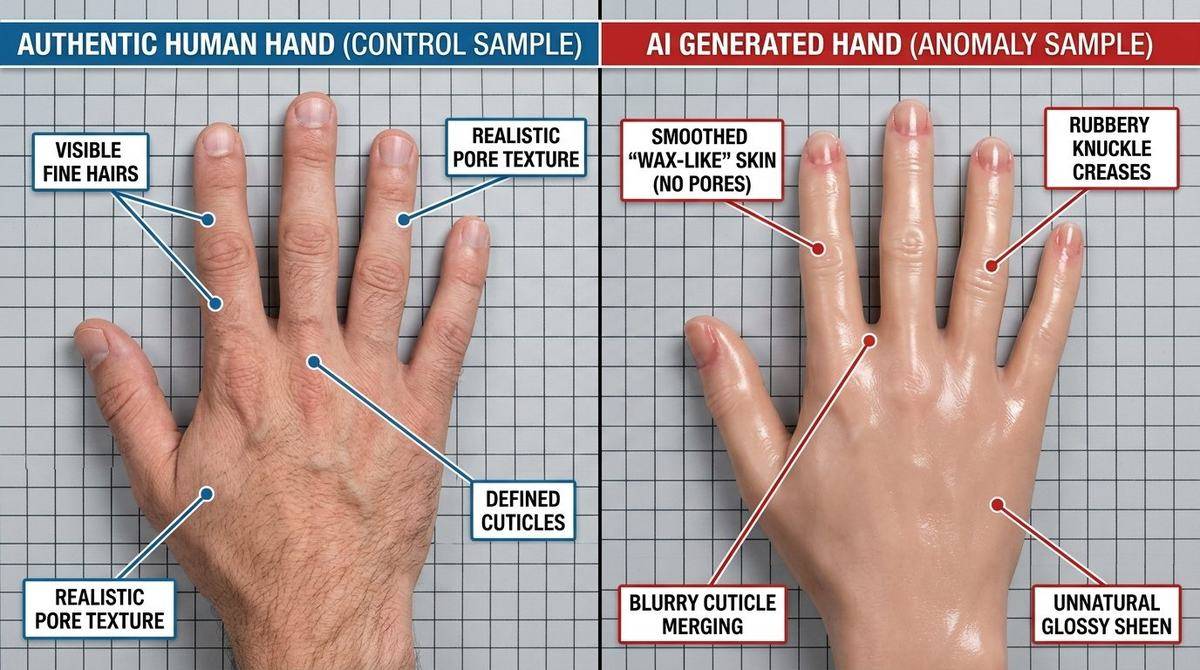
How the OriginSift Workbench Inspects This:
Alongside visual inspection, our AI Prompt & Workflow Extractor checks the file container for embedded AI workflow parameters (prompts, negative prompts, checkpoints, LoRAs, and seeds written by AUTOMATIC1111, ComfyUI, SwarmUI, Fooocus, and NovelAI in PNG or JPEG/WebP EXIF headers) and validates C2PA Content Credentials.
3. Garbled Script & Background Typography
Even when a model renders a convincing central subject, small background text—such as street signs, license plates, badges, and book spines—often breaks down into garbled glyphs.
How to Spot It With Your Naked Eye:
- Read the Background Details: Zoom in on storefront signs, billboards, license plates, t-shirt slogans, and uniform patches in the background.
- Look for Pseudo-Letters: Image models often render small background text as shapes that resemble letters from a distance but dissolve into hybrid strokes or nonsensical spelling up close.
- Check Letter Consistency: Repeated letters on the same sign often have noticeably different fonts or merged strokes.
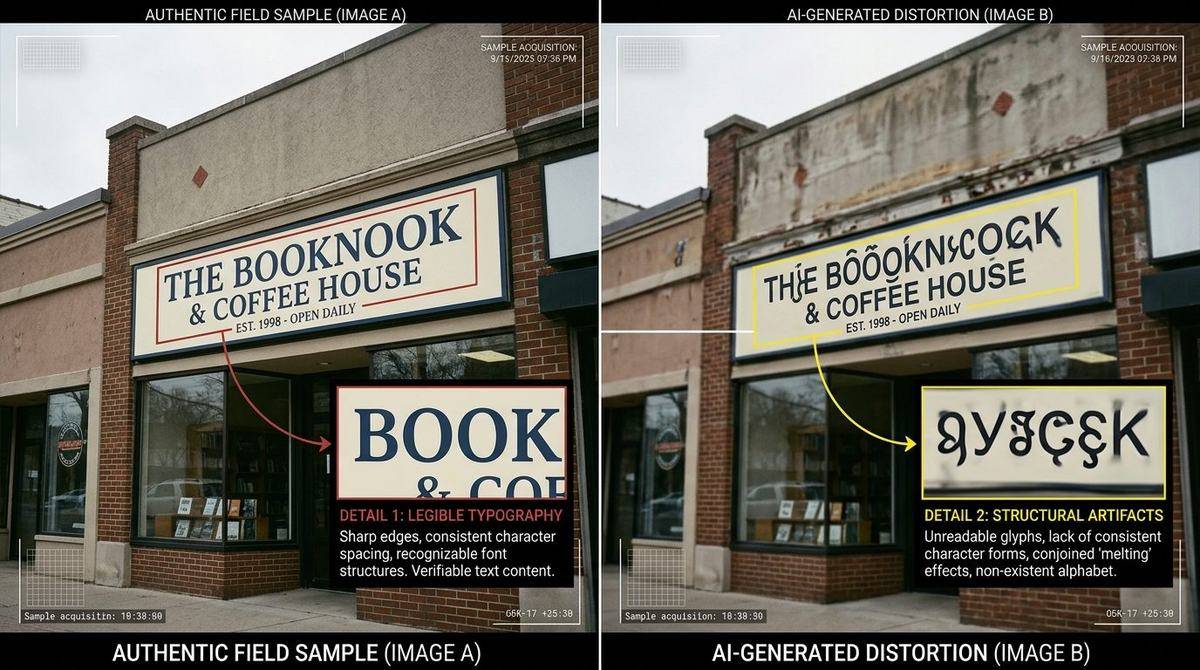
How the OriginSift Workbench Inspects This:
OriginSift complements naked-eye inspection with 2D Fast Fourier Transform (FFT) Spectrum Analysis (which detects periodic upscaler grid spikes in the frequency domain) and Invisible Watermark Scanning (checking for DWT-DCT / Stable Diffusion watermark carriers).
4. Inconsistent Geometry: Warped Lines & Mismatched Reflections
In physical photography, architecture and optical reflections follow straight lines and consistent perspective. Image generators predict pixels statistically, which can cause background lines to shift or disappear behind objects.
How to Spot It With Your Naked Eye:
- Follow Continuous Lines: Trace suspension bridge cables, stair handrails, window frames, or floor tile grout lines when they pass behind a person. In AI images, lines often fail to line up on the other side.
- Verify Mirror & Water Reflections: Check puddles, car windshields, sunglasses, or water surfaces to see whether the reflection matches the scene above.
- Check Background Crowds: People in the far background of busy AI scenes sometimes have merged coats, missing limbs, or distorted proportions.
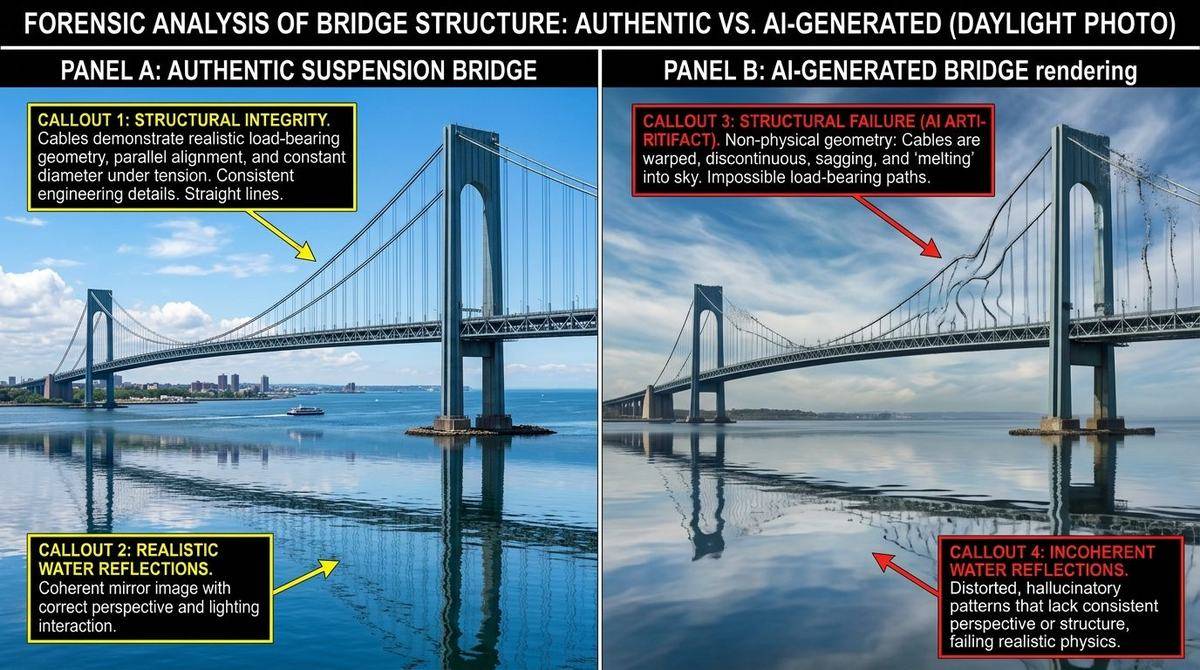
How the OriginSift Workbench Inspects This:
When a viral image has had its metadata stripped by social media, OriginSift computes its SHA-256 & 64-bit Perceptual dHash and provides a 1-Click OSINT Reverse Image Search Launchpad (Google Lens, TinEye, Bing Visual Search, Yandex) so you can trace where and when the image first appeared online.
5. Container Provenance: Camera EXIF, C2PA Credentials & AI Parameters
Original camera files—from smartphone sensors to mirrorless cameras—record capture tags inside the file known as EXIF metadata, and modern cameras and creative tools increasingly attach signed C2PA Content Credentials.
Important Real-World Caveat: Social networks like X, Instagram, and WhatsApp routinely strip EXIF and C2PA metadata when re-encoding uploads. Therefore, missing metadata on a social-media image is neutral and does not prove an image is AI-generated. However, when metadata is preserved, it provides high-value provenance clues.
How to Check Metadata on Your Device:
- On iPhone / Android: Open an original photo in your camera roll and tap the (i) Info button to view camera model, lens focal length, aperture, shutter speed, and ISO.
- On Windows / Mac: Right-click the image file > Properties / Get Info > Details tab.
- What Unstripped AI Images Often Contain: Instead of camera exposure tags, original files from tools like AUTOMATIC1111, ComfyUI, SwarmUI, or Fooocus often store generation prompts and model parameters in PNG chunks or EXIF comments, while DALL-E and Firefly attach C2PA manifests.
How the OriginSift Workbench Inspects This:
OriginSift validates cryptographic C2PA Content Credentials, parses EXIF/XMP/IPTC metadata, and recovers AI prompts and workflows from PNG chunks and JPEG/WebP EXIF headers. Remember that uncompressed EXIF strings can be edited with tools like ExifTool, so OriginSift treats EXIF as supporting context and C2PA cryptographic signatures as verifiable provenance.
Quick Verification Cheat Sheet
Use this checklist next time a dramatic image pops up in your feed:
| Check Target | Authentic / Unedited Clues | Common Synthetic / Edited Clues |
|---|---|---|
| OSINT Reverse Search | Traced to a reputable photojournalist or original event source | First appeared on an AI art forum, meme account, or has no real-world source |
| Pupils & Catchlights | Round pupils; consistent reflection angle in both eyes | Irregular pupils; mismatched reflections between left and right eyes |
| Hands & Details | Natural finger joints, clear nail cuticles, consistent accessories | Merged digits, blurry cuticle boundaries, or distorted jewelry |
| Background Text & Lines | Legible signage and continuous architectural lines | Garbled pseudo-letters and lines that shift behind subjects |
| C2PA & File Metadata | Valid camera C2PA signature or consistent camera EXIF on original file | C2PA AI source tag or embedded diffusion prompt/workflow parameters |
Test Any Photo or Video with Our Standalone AI Detectors
Drop any image, video, or URL into our dedicated single-purpose workbenches for instant in-memory analysis:



Related Field Guides & Blog Articles
Explore more plain-English guides on camera EXIF provenance and AI writing patterns:
 📷 EXIF & Camera Guide
 ✍️ Writing Style Guide